What is Mendix?
Mendix is a high-productivity, all-in-one low-code application development platform that enables the creation, deployment, and maintenance of web and mobile applications at enterprise scale. As a Siemens company acquired for approximately $700 million in 2018, it’s designed to accelerate digital transformation by bridging the gap between business users and professional developers.
Its key features include:
- Dual IDE approach: Mendix Studio (web-based, no-code) for business users and citizen developers, plus Mendix Studio Pro (desktop, low-code) for professional developers
- Visual, model-driven development with drag-and-drop interface and WYSIWYG page editor
- AI-assisted development through Mendix Assist, providing real-time recommendations and error prevention
- Workflow Editor with BPMN elements for modeling complex business processes
- Multi-experience development supporting responsive web, native mobile (iOS/Android via React Native), and Progressive Web Apps from a single model
- Mendix Connect (formerly Data Hub) for integration with external systems, REST APIs, OData services, and enterprise platforms like SAP and Salesforce
- Mendix Cloud for one-click deployment with auto-scaling, high availability, and multi-region failover
- Collaboration tools including built-in agile project management, Git-based version control, and feedback management
When a team builds with Mendix, they get a unified environment where business stakeholders can prototype in Studio, professional developers can add complexity in Studio Pro, and both share the same underlying model. The platform generates standard code, handles deployment, and provides monitoring, all while maintaining enterprise-grade security and governance.
However, Mendix’s comprehensive approach means it’s designed to handle a wide range of application development scenarios. For organizations with more focused needs (like specialized data management workflows, tight Microsoft ecosystem integration, or rapid startup MVPs) a purpose-built alternative might deliver better results with less overhead.
Looking for a specialized solution for external data management and partner onboarding? Manch provides purpose-built workflows for MDM, eKYC, and compliance verification with deployment in weeks, not months. Learn more about how Manch can streamline your external stakeholder processes.
How We Curated Our List of Mendix Alternatives
After testing Mendix and researching the low-code market, we found that while Mendix excels as a comprehensive application development platform, different organizations have specific requirements that benefit from more specialized solutions. We focused on platforms that address needs where Mendix’s all-in-one approach might be more than necessary, or where a specialist tool offers deeper capabilities:
- External data management and compliance workflows for enterprises managing partners, vendors, and customers
- Mission-critical application development with advanced AI agent capabilities and enterprise governance
- Microsoft ecosystem integration for organizations standardized on Microsoft 365 and Azure
- Cost-effective low-code for small businesses that don’t need enterprise-scale features
- Rapid MVP development for startups focused on speed-to-market over enterprise features
- Developer-centric internal tools with open-source flexibility and self-hosting options
- Simple internal applications where Mendix’s comprehensive feature set would be overkill
Each platform on this list excels in one of these specific scenarios. You might use them alongside Mendix for specialized workflows, or as a complete replacement depending on your primary needs.
| ❗DISCLAIMER: We aren’t covering every low-code platform on the market! Our focus is on highlighting the best alternatives that address specific use cases where a more specialized or differently-focused solution might serve you better than Mendix’s comprehensive approach. |
|---|
1. Manch: Best Alternative for External Data Management and Partner Onboarding Workflows
Manch is an API-first, cloud-native digital transformation platform that specializes in External and Master Data Management (MDM) for enterprises. What sets Manch apart is its pre-integrated APIs that enable real-time data verification, validation, and authentication within seconds, eliminating the need for organizations to set up back-office teams for manual verification processes. While Manch excels at MDM, it’s fundamentally a versatile platform where users can configure any business process to be digitized using a true no-code approach.
Its key features include:
- Pre-integrated APIs for real-time verification of PAN, GST, Aadhaar, bank accounts, and other critical data points, delivering validation in seconds rather than days
- Configuration-based deployment using a drag-and-drop interface that delivers approximately 3x faster deployment than traditional coding-heavy platforms
- Master Data Management (MDM) with centralized repository, “First Time Right” validation at point of entry, and AI-powered duplicate detection with confidence scoring
- Digital onboarding workflows for partners, vendors, employees, and customers, with documented cases of reducing seven-day onboarding processes to 30 minutes
- eKYC and video KYC capabilities meeting RBI and SEBI regulatory requirements
- Process Configurator with “lego-like building blocks” for creating custom workflows without coding
- AI/ML-powered fraud detection including face extraction, face comparison, and document auto-detection
- mSign for digital signatures with single OTP authentication and multi-party support
- System-agnostic integration with SAP, Microsoft 365/Dynamics 365, Salesforce, and legacy systems without vendor lock-in
For enterprises whose primary need is managing external stakeholder data and onboarding workflows rather than building full custom applications, Manch provides a specialized solution that typically goes live in 4-6 weeks compared to months or years with general-purpose platforms.
Why Choose Manch Over Mendix for External Data Management and Onboarding
While Mendix is a powerful low-code platform for building diverse applications, it requires skilled developers despite the “low-code” label, with a steeper learning curve and technical ramp-up needed for complex implementations. Manch takes a fundamentally different approach by offering true no-code capability with pre-built frameworks specifically designed for external data management. For organizations whose core challenge is external data management rather than general application development, this specialization translates into significant advantages in speed, cost, and business agility.
API-First Architecture with Pre-Integrated Verification: Real-Time Validation Without Back-Office Setup
The most significant differentiator is Manch’s API-first architecture with pre-integrated APIs for real-time data verification. Traditional approaches, including building verification workflows on platforms like Mendix, require organizations to set up back-office teams, build custom integrations with verification services, and accept lag time between data input and verification.
Manch eliminates this entirely. The platform comes with APIs already integrated for publicly available verification infrastructure, enabling real-time validation of PAN, GSTN, bank accounts (via penny drop), Aadhaar (via DigiLocker), and other critical data points. When data enters the system, verification happens in seconds, not days.
This “First Time Right” validation philosophy means data is verified at the point of entry rather than cleaned in batches after it enters your systems. The platform prevents duplicate creation at source by applying validation rules at the time of data creation, helping ensure accuracy from the start rather than requiring post-facto cleanup.
⚡ Manch in Action: When a new distributor applies to join your network, they enter their business details through a self-serve portal. Manch’s OCR automatically extracts data from uploaded documents like GST certificates and PAN cards. The system validates this information against government databases in real-time, checks for inconsistencies using AI-powered triangulation, and flags any issues before the data enters your ERP system. What would typically require seven days of back-office verification now happens in 30 minutes, with significantly reduced manual data entry errors.
3x Faster Deployment Through Configuration, Not Coding
While Mendix offers powerful application development capabilities, building MDM workflows from scratch requires designing data models, creating validation logic, building approval workflows, and developing user interfaces. Typical enterprise implementations can take months to years.
Manch uses configuration rather than coding, which means deployment is approximately 3x faster than traditional platforms. Pre-built frameworks and accelerators enable typical deployments in 4-6 weeks, with some going live as quickly as 4 weeks. This represents a 30-50% reduction in delivery time compared to building from scratch, allowing organizations to achieve measurable results within the same quarter rather than waiting 6-12 months for ROI.
The Process Configurator includes templates for common scenarios: multi-party agreements, corporate account opening, partner onboarding, vendor management, and employee consent workflows. The “lego-like building blocks” represent functions specific to onboarding and verification: information collection, KYC verification, document validation, approvals, and digital signatures.
⚡ Manch in Action: Your compliance team needs to implement a new vendor verification workflow that includes document collection, real-time GST and PAN validation, video KYC for high-value vendors, multi-level approval routing, and digital contract signing. With Manch, you configure this by dragging pre-built blocks into sequence and setting business rules. The entire workflow can be operational in days. The same workflow built from scratch on a general-purpose platform would require months of development time.
Built-In Compliance and Enterprise-Grade Security
Compliance verification is table stakes for external stakeholder management. With Mendix, you’d need to build and maintain integrations with verification services through REST APIs and custom connectors.
Manch includes comprehensive verification capabilities as core platform features. The eKYC module supports both individual and enterprise verification with real-time validation. Video KYC capabilities meet RBI and SEBI regulatory requirements for remote identity verification, including live video sessions, facial comparison, liveness detection, and ML-based speech-to-text.
The platform is built with enterprise-grade security including role-based access control, comprehensive audit trails, data encryption, and compliance aligned with industry standards. Manch is ISO 27001 and SOC2 Type2 compliant, meeting the rigorous security and compliance requirements of regulated industries.
⚡ Manch in Action: A financial services company needs to onboard retail partners with regulatory-compliant KYC. When a partner initiates the process, they upload their ID documents. Manch’s OCR extracts the data, the AI verifies the document is genuine (not a photocopy of a photocopy), face extraction pulls the photo from the ID, and the video KYC session compares the live person to the ID photo. Verification results, including the recorded video session, are stored for regulatory reporting. The entire process can be completed in minutes rather than days, with compliance built in rather than bolted on.
Business User Empowerment: True No-Code for Operations Teams
A critical aspect of external data management is enabling business teams to drive processes without constant IT involvement. Mendix’s dual IDE approach still requires professional developers in Studio Pro for complex logic, creating IT dependency for changes and updates.
Manch is designed for business ownership, not just IT control. Operations, finance, and compliance teams can configure workflows, update business rules, and make changes in minutes rather than submitting IT tickets and waiting weeks or months for updates. The drag-and-drop interface allows customers to make simple changes themselves without raising change requests or paying for minor modifications.
This represents true no-code capability where non-technical teams can participate directly in workflow configuration. Organizations can iterate and improve processes continuously based on actual business needs rather than waiting for massive transformation programs.
Platform Versatility and Zero Vendor Lock-In
While Manch excels at MDM and external data management, it’s fundamentally a digital transformation platform capable of digitizing any business process. This versatility is proven by the platform’s zero customer churn rate: customers discover they can do much more on the platform beyond the initial implementation scope, from contract management and asset tracking to retailer onboarding and vendor management.
Manch operates on open standards with no proprietary runtime environment, ensuring data and process portability without vendor lock-in concerns. The platform integrates equally well across SAP, Oracle, Microsoft, Salesforce, legacy systems, and any other enterprise applications. As an SAP partner, integration with SAP is a standard capability, but unlike platforms optimized for specific vendor ecosystems, Manch is designed from the ground up to be system-agnostic.
This is particularly important for organizations with heterogeneous IT landscapes. The platform acts as a bridge between different systems, handling older ERP, CRM, and bespoke systems out-of-the-box without requiring extensive middleware or custom development work.
Cost-Effective Enterprise-Grade Capabilities
Manch delivers enterprise-grade capabilities at a fraction of the cost of larger competitors. Organizations see 30-40% lower total cost of ownership compared to larger enterprise platforms when considering licensing, implementation, and ongoing maintenance costs combined. The platform eliminates the need for back-office resources dedicated to data entry and verification, allowing teams to focus on data governance rather than data collection.
Pricing is competitive and transparent, avoiding the hidden costs that accumulate with other platforms through premium connectors, API usage fees, or expensive partner-led implementations. The platform delivers comparable or superior functionality for external data management while maintaining significantly lower costs over a 3-5 year period.
Manch Pricing
Manch uses a quote-based, flexible pricing model with three tiers designed to scale with your needs:
Starter
- Basic platform access
- Self-service mode
Premium
- Everything in Starter
- MDM (Master Data Management)
- mSign digital signatures
Enterprise
- Everything in Premium
- eKYC and video KYC
- API access
- AI/ML advanced tools
Manch offers a free trial with no credit card required. The company emphasizes flexible, transparent pricing that allows customers to start with one use case and scale as needed. Total cost of ownership is significantly lower than enterprise alternatives, with licensing and implementation costs combined often being less than just the license fees of premium platforms.
Who Should Use Manch?
Choose Manch if:
- Your primary challenge is managing external stakeholder data (partners, vendors, distributors, customers) rather than building general-purpose applications. If you’re spending significant resources on partner onboarding, vendor verification, or customer data management, Manch’s specialized approach will deliver results in 4-6 weeks rather than months.
- You need built-in compliance and KYC verification for regulatory requirements. If your onboarding processes require identity verification, document validation, or video KYC to meet RBI, SEBI, or similar regulations, Manch provides these capabilities without integration projects.
- You want to empower business teams with self-service capabilities. If you’re looking to reduce IT dependency by letting operations, finance, and compliance teams configure workflows and make changes themselves, Manch’s true no-code approach is purpose-built for business ownership.
- Speed of deployment and cost efficiency matter. If you need to be operational in weeks rather than months, with 30-40% lower total cost of ownership than enterprise platforms, Manch’s configuration-based approach and pre-built frameworks accelerate time-to-value.
- You have a heterogeneous IT landscape. If your organization uses multiple ERPs, CRMs, or legacy systems, Manch’s system-agnostic integration eliminates vendor lock-in and connects across platforms without extensive middleware.
Ready to streamline your external data management? Manch helps enterprises digitize partner onboarding, automate compliance verification, and create a single source of truth for external stakeholder data, with deployment in weeks and 30-40% lower TCO. Request a demo to see how Manch can transform your workflows.
2. OutSystems: Best Alternative for Mission-Critical Apps and AI Agents with Full Lifecycle Governance
OutSystems is a high-performance, AI-powered low-code development platform designed for building, deploying, and managing enterprise-grade web and mobile applications at scale. As a direct enterprise alternative to Mendix, OutSystems positions itself for organizations that need mission-critical applications with robust governance, advanced AI capabilities, and full lifecycle management.
Its key features include:
- Visual, model-driven development (Service Studio) with drag-and-drop functionality and AI-assisted coding
- Full-stack application development supporting complex business logic, database operations, and both web and mobile channels
- AI Agent Builder for creating and deploying generative AI agents with a no-code interface
- AI Mentor System that continuously analyzes code for maintainability, performance, and security issues
- Comprehensive DevOps automation with one-click deployment, version control, and CI/CD tools
- Enterprise integration capabilities with extensive connectors for SAP, Salesforce, Microsoft Dynamics 365, and other systems
Why Choose OutSystems Over Mendix for Mission-Critical Applications
OutSystems differentiates itself through deep AI integration and performance-focused architecture:
- Superior AI Integration Throughout the Development Lifecycle OutSystems embeds AI at every stage rather than treating it as an add-on. The AI Mentor System analyzes code every 12 hours, identifying unused code, performance bottlenecks, and security vulnerabilities with actionable remediation guidance. The AI Agent Builder enables creation of sophisticated generative AI agents through a no-code interface, supporting use cases like intelligent document processing and automated customer service. Both OutSystems and Mendix now offer agentic AI capabilities, though OutSystems’ AI Mentor provides continuous code analysis that helps maintain application quality over time.
- Higher-Performance Code Generation OutSystems generates optimized, standard C#, JavaScript, and SQL code that compiles into native performance applications. Mendix relies more on interpreted code patterns. For mission-critical systems handling high transaction volumes with sub-second response requirements, this distinction matters. OutSystems’ automatic database optimization, including automated indexing, helps maintain performance as data volumes grow.
- More Comprehensive Enterprise Integration OutSystems’ Integration Builder offers wizard-style configuration for connecting to SAP, Salesforce, ServiceNow, and Microsoft Dynamics 365, abstracting authentication complexities. The Forge marketplace includes over 400 pre-built, production-ready connectors.
🏅 NOTE: We also evaluated Appian and Pega Platform for the enterprise low-code archetype. Appian excels at business process management and workflow automation, while Pega brings strength in customer decision management. OutSystems offers a comprehensive full-stack development environment for teams needing mission-critical applications with advanced AI agent capabilities and enterprise-grade performance.
OutSystems Pricing
OutSystems follows a subscription-based model with costs determined by application complexity (measured in Application Objects), end-user count, and required capabilities.
OutSystems Developer Cloud (ODC)
- Starts at $36,300 (USD) per year
- Includes 1 medium-sized production application
- Supports 100 internal end-users
- Includes development, testing, and production environments
- Professional support (8×5), 99.5% uptime guarantee
Advanced Options
- 24×7 support upgrade available
- Enhanced 99.95% uptime guarantee for mission-critical applications
- Additional compliance certifications (SOC2 Type II, PCI DSS)
- Self-hosted deployment option
- Scaling for additional users and larger applications
ODC Evaluation Edition
- Free 30-day trial, no credit card required
- Up to 100 users for testing
- Development and non-production environments only
Who Should Use OutSystems?
Choose OutSystems if:
- You’re building mission-critical applications that require enterprise-grade performance, security, and governance, particularly core business systems where downtime directly impacts revenue.
- You need sophisticated AI capabilities including the ability to build and deploy custom generative AI agents for document processing, customer service automation, or AI-human collaborative workflows.
- Your IT landscape includes complex integrations with enterprise systems like SAP, Salesforce, or Microsoft Dynamics 365, and you need a platform that can modernize these systems while preserving existing investments.
3. Zoho Creator: Best Alternative for Small Businesses in the Zoho Ecosystem
Zoho Creator is a cloud-based low-code application platform designed for small and mid-sized businesses to build custom applications without extensive coding. Unlike Mendix’s enterprise-focused approach, Zoho Creator is designed for accessibility and offers competitive pricing while providing deep integration with the broader Zoho business suite.
Its key features include:
Why Choose Zoho Creator Over Mendix for Small Businesses
Zoho Creator offers advantages specifically for SMBs in the Zoho ecosystem:
- Radically Lower Cost of Ownership Mendix’s entry-level paid plans start at $75/month for a single application with only 5 users, with Standard tier beginning at $998/month. Zoho Creator operates on transparent, SMB-friendly per-user pricing starting at $8/user/month. For small businesses with 10-15 employees needing custom applications, this price difference often determines feasibility.
- Native Zoho Ecosystem Integration Zoho Creator provides first-party integration with 45+ Zoho applications using a unified data access model. When a Creator application needs Zoho CRM data, it uses Deluge’s built-in functions like zoho.crm.createRecord() with simplified authentication (though a one-time connection setup may be required). For businesses already using Zoho Books for accounting, Zoho CRM for customers, and Zoho Desk for support, Creator acts as the “custom extension engine” that connects everything.
- Simplified Development for Non-Technical Users Zoho Creator is designed for users who may not have professional development backgrounds. Dragging a field onto a form canvas creates the database column automatically. Deluge scripts use readable syntax for common operations. Business users can build functional applications after learning the basics.
🏅 NOTE: We also evaluated AppSheet, Quickbase, and Clappia for this small business archetype. AppSheet excels at spreadsheet-to-app transformation with Google Workspace integration, while Quickbase offers strong collaboration features. Zoho Creator offers the best combination of SMB-friendly pricing, native Zoho ecosystem integration, and low entry barrier for small businesses without dedicated development teams.
Zoho Creator Pricing
Zoho Creator uses per-user, per-month subscription pricing:
- Standard Plan: Core visual development, Deluge scripting, standard integrations
- Professional Plan: Advanced features including Blueprint process management
- Enterprise Plan: Enhanced governance, higher limits, white-label portals
Note: Specific pricing varies; check Zoho’s official pricing page for current rates.
Who Should Use Zoho Creator?
Choose Zoho Creator if:
- Your business already operates within the Zoho ecosystem and you need custom applications that seamlessly share data across Zoho CRM, Books, Desk, and other Zoho tools without complex integration work.
- Your budget makes enterprise platforms prohibitive, particularly if you’re a small business under 50 employees where $1,000+/month for application development represents a significant technology spend.
- You need to empower non-technical business users to build functional applications for departmental workflows without requiring professional development expertise.
4. Microsoft Power Apps: Best Alternative for Microsoft-Centric Organizations
Microsoft Power Apps is a comprehensive low-code development platform and core component of the broader Microsoft Power Platform ecosystem. It enables organizations to build custom web and mobile applications while maintaining deep native integration with Microsoft 365, Dynamics 365, and Azure services.
Its key features include:
- Canvas apps with pixel-perfect UI customization using Excel-like Power Fx formulas
- Model-driven apps that automatically generate interfaces from Microsoft Dataverse data structures
- Power Pages for external-facing business websites
- Microsoft Dataverse as a secure, cloud-based data platform
- AI Builder for incorporating AI models without data science expertise
- 1,400+ pre-built connectors to Microsoft and third-party applications
- Teams integration for embedding apps in collaborative workspaces
Why Choose Power Apps Over Mendix for Microsoft-Centric Organizations
Power Apps offers advantages for organizations deeply invested in Microsoft, though it’s important to understand both the benefits and limitations:
- Unparalleled Microsoft Ecosystem Integration Power Apps applications embed directly into Microsoft Teams channels. The integration extends to SharePoint (replacing default forms), Outlook, and Dynamics 365. Since Dynamics 365 customer engagement apps (Sales, Customer Service, Marketing) are built on the same Dataverse foundation, extending Dynamics functionality requires less integration effort. Note that Dynamics 365 finance and operations apps use their own schemas and integrate with Dataverse differently. This native integration differs from Mendix’s connector-based approach to Microsoft services.
- Unified Power Platform Experience Power Apps isn’t standalone; it’s part of a cohesive ecosystem where Power Apps (development), Power Automate (workflow), Power BI (analytics), and Power Virtual Agents (chatbots) share the same data platform. Power BI maintains its own workspace security model, but a business user can build a Power App, create a Power Automate flow for processing, display insights in Power BI, and deploy a chatbot, all within the Power Platform.
- Flexible Licensing with Seeded Rights Microsoft includes “seeded” Power Apps capabilities within many Microsoft 365 and Dynamics 365 licenses. Employees with these licenses can create and run certain Power Apps at no additional cost. This provides a low-risk way to experiment before making licensing investments.
Important Considerations: While Power Apps excels within the Microsoft ecosystem, the moment you need to go cross-platform (integrating with SAP, Oracle, Salesforce, or legacy applications), integration can become complex and expensive. Premium connectors, high API usage, and advanced features can significantly increase costs at scale. Organizations with heterogeneous IT landscapes or those needing heavy integration with diverse systems should carefully evaluate total cost of ownership.
🏅 NOTE: We considered Salesforce Platform and ServiceNow as potential Microsoft ecosystem alternatives. Salesforce Platform excels at CRM-centric development, while ServiceNow focuses on IT service management. Power Apps offers the most comprehensive platform for organizations seeking unified low-code development within a Microsoft-centric technology strategy, though organizations with mixed tech stacks may find ecosystem-neutral alternatives more cost-effective.
Microsoft Power Apps Pricing
Power Apps offers tiered pricing with flexibility:
Power Apps Developer Plan (Free)
- Individual development and testing
- 2 GB Dataverse capacity, 3 development environments
- Not for production deployment
Power Apps Premium
- €18.70 per user/month (standard volume)
- €11.20 per user/month (enterprise volume, 2,000+ seats)
- Unlimited apps, premium connectors
- 250 MB Dataverse database capacity per user
Capacity Add-Ons
- Additional Dataverse storage, Power Pages users, Copilot Studio messages available
Who Should Use Microsoft Power Apps?
Choose Power Apps if:
- Your organization has standardized on Microsoft 365 and you want low-code capabilities that integrate with Teams, SharePoint, Outlook, and other Microsoft services. Single sign-on is generally seamless, though occasional manual sign-in may be required in some scenarios.
- You need a unified platform combining application development, workflow automation, business intelligence, and conversational AI in a single governed environment rather than integrating multiple point solutions.
- You have existing Dynamics 365 investments and want to extend functionality or create companion applications that share the same data model and security framework with significantly less integration effort.
Consider alternatives if your organization uses multiple ERPs, CRMs, or has significant non-Microsoft systems, as integration complexity and premium connector costs can escalate quickly.
5. Bubble: Best Alternative for Startups Building Web SaaS MVPs
Bubble is a visual no-code application builder designed for rapid development and deployment of full-stack web applications. Bubble is specifically popular among startups and product teams building SaaS platforms and minimum viable products.
Its key features include:
Why Choose Bubble Over Mendix for Rapid MVP Development
Bubble offers advantages for startup scenarios:
- Strong Focus on Web SaaS and MVP Speed While Mendix serves the full spectrum of enterprise needs, Bubble has traditionally focused on web SaaS applications, though it has recently added native mobile capabilities in beta. This focus means the platform is architected for speed and simplicity rather than comprehensive enterprise governance. Product teams can move from concept to launched application faster without navigating extensive features designed for complex enterprise systems.
- Startup-Centric Infrastructure and Community Bubble provides built-in hosting and infrastructure management, removing cloud architecture decisions from the product team’s plate entirely. The plugin marketplace and community are specifically oriented around startup needs: common SaaS patterns, payment integrations, and rapid iteration.
- Simplified Scope as a Feature Bubble doesn’t emphasize enterprise workflow automation or legacy system integration. For product teams focused primarily on validating a web-based SaaS concept, this streamlined approach reduces complexity and learning curve. The platform is optimized for getting a web app in front of customers quickly.
🏅 NOTE: We evaluated Webflow, Glide, and Adalo as other specialist tools for rapid development. Webflow excels at marketing websites, while Glide and Adalo focus on mobile-first applications. Bubble offers a comprehensive no-code environment for fully-featured web applications with strong traction in the startup community.
Bubble Pricing
Bubble offers tiered pricing based on application needs (prices shown are for annual billing; monthly rates are higher):
- Free: Build and prototype applications
- Starter: $29/month for basic production apps
- Growth: $119/month for scaling applications
- Team: $349/month for collaboration features
- Enterprise: Custom pricing for advanced needs
Who Should Use Bubble?
Choose Bubble if:
- You’re a startup founder or product team focused on launching a web-based SaaS platform or MVP where speed-to-market is the primary concern, not enterprise governance or multi-channel development.
- You want all-inclusive hosting and infrastructure managed for you, allowing complete focus on product development without DevOps expertise.
- Your team consists of non-technical founders who need a purely visual building experience to validate ideas without learning professional development concepts.
6. Appsmith: Best Alternative for Developer Teams Building Internal Tools
Appsmith is an open-source, low-code development platform specifically engineered for developers building internal applications. It provides drag-and-drop interface building with deep JavaScript integration, offering the speed of low-code without sacrificing developer control.
Its key features include:
Why Choose Appsmith Over Mendix for Internal Tool Development
Appsmith offers advantages for developer-centric teams:
- Developer-First Philosophy Appsmith assumes users are comfortable with JavaScript and SQL. Every widget property can be controlled with JavaScript expressions using mustache syntax. The platform includes a full JavaScript IDE with dedicated JS Objects for multi-line functions. While Mendix invests in making low-code accessible to non-technical users, Appsmith invests in making JavaScript integration seamless for developers who want to drop into code when needed.
- Focused on Internal Tools with Expanding Capabilities Appsmith’s core focus is internal tools: admin panels, dashboards, CRUD interfaces, and operational workflows. It doesn’t offer native mobile app development. However, Appsmith has expanded its capabilities to include Workflows for automation and External Client Portal features for certain external-facing scenarios. For teams building internal tools specifically, this focused approach means faster development.
- Open-Source Economics and Control Appsmith’s free tier includes unlimited applications. The Business plan at $15/user/month covers unlimited applications (not per-app pricing). The Apache 2.0 license means organizations can inspect source code, contribute features, and fork if needed. If Appsmith ceased operations, organizations retain full access to the source code.
🏅 NOTE: We evaluated Retool and ToolJet as other developer-focused options. Retool offers polished pre-built integrations, while ToolJet provides another open-source option. Appsmith offers comprehensive JavaScript integration and flexibility for teams needing deep customization while maintaining open-source cost-effectiveness.
Appsmith Pricing
Free Plan (Community Edition)
- $0 for unlimited applications
- Up to 5 users on Cloud
- All core features, Git integration, community support
Business Plan
- $15 per user/month (not per application)
- Unlimited workspaces and applications
- Audit logs, custom roles, priority support, Workflows
Enterprise Plan
- Starting at $2,500/month for 100 users
- SSO/SCIM integration, custom branding
- 24×7 support with SLA, airgapped deployment option
Who Should Use Appsmith?
Choose Appsmith if:
- Your team consists primarily of developers comfortable with JavaScript who want low-code speed without sacrificing the ability to drop into code for custom logic and complex data transformations.
- You’re focused on internal tool development (admin panels, dashboards, database interfaces) rather than customer-facing applications or multi-channel experiences.
- You want open-source transparency and control with self-hosting options, source code access, and economics that don’t penalize you for building multiple applications.
7. Budibase: Best Alternative for Simple Internal Tools and CRUD Apps
Budibase is an open-source low-code platform engineered for IT teams building internal business applications, admin panels, and workflow tools. Founded by developers frustrated with “reinventing the wheel” for internal tooling, Budibase provides a streamlined path from idea to working application with a built-in database and intuitive development experience.
Its key features include:
Why Choose Budibase Over Mendix for Simple Internal Applications
Budibase offers advantages for straightforward internal tool needs:
- Built-In Database Eliminates Setup Budibase includes a fully functional database that provisions automatically when you create tables. You can install Budibase, create a table in a spreadsheet-like interface, and start building UI immediately. While Mendix Cloud does provision PostgreSQL automatically for cloud deployments, other deployment options may require database provisioning. For teams starting internal tools from scratch, Budibase’s integrated database removes infrastructure complexity.
- Open-Source with True Self-Hosting Budibase’s open-core model (AGPL v3 for Builder, GPL v3 for Server) means the entire codebase is available on GitHub with over 27,000 stars. For organizations with strict data residency requirements, self-hosting can help ensure data stays within your infrastructure (though achieving specific compliance like HIPAA or GDPR still depends on your overall configuration and processes). This provides protection against platform abandonment that proprietary platforms cannot match.
- Dramatically Lower Complexity Budibase provides three tabs (Data, Design, Automate) with a mental model of “connect to data sources, build screens, add automation.” For IT teams building approval forms or dashboards, this simplicity means less documentation time and faster shipping.
🏅 NOTE: We evaluated Appsmith and ToolJet as other open-source options. Appsmith offers stronger Git integration and developer focus, while ToolJet provides similar database connectors. Budibase offers polished out-of-the-box UI (via Adobe Spectrum) and smooth onboarding with its built-in database for teams replacing spreadsheet-based processes.
Budibase Pricing
Budibase uses a creator/user hybrid model:
Free Plan
- $0 forever
- Up to 5 users (Cloud) / 20 users (self-hosted)
- Unlimited apps, SSO support included
Premium Plan
- $50/creator/month + $5/user/month
- No user limits, 25,000 database records
- Custom branding, multiple workspaces
Enterprise Plan
- Custom pricing
- Active Directory/SCIM, enforceable SSO
- Custom automation limits, air-gapped deployment
Who Should Use Budibase?
Choose Budibase if:
- Your primary need is internal tools (admin panels, approval workflows, inventory systems). Note that Budibase also offers portal templates for some external-facing scenarios.
- You want data sovereignty options through self-hosting. For compliance scenarios (HIPAA, GDPR, industry-specific), self-hosting helps keep data within your infrastructure, though achieving full compliance depends on your overall configuration and processes.
- You’re replacing spreadsheet-based processes with proper web applications and need a simple path from Excel files to functioning internal apps, including CSV upload wizards and visual data modeling.
The Final Verdict
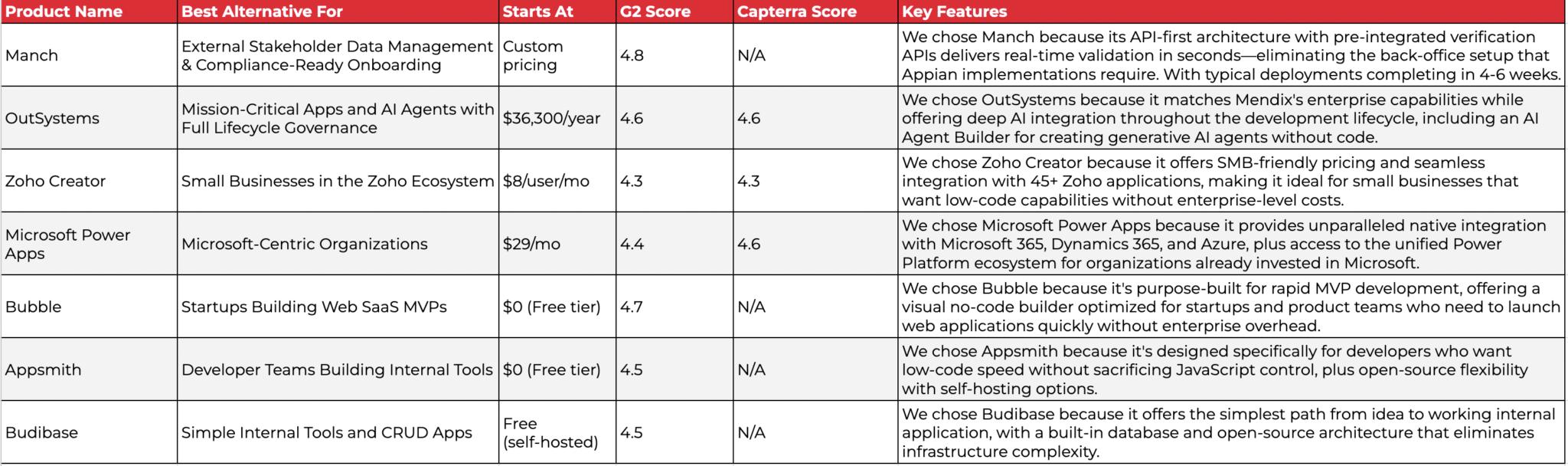
While Mendix excels as a comprehensive enterprise low-code platform, different organizations have different primary needs. Based on our research, here are the best alternatives for specific scenarios:
- Manch for specialized external data management, partner onboarding, and compliance-driven MDM workflows, with API-first real-time verification, deployment in 4-6 weeks, and 30-40% lower total cost of ownership
- OutSystems for mission-critical enterprise applications with advanced AI agent capabilities
- Zoho Creator for small businesses wanting affordable low-code within the Zoho ecosystem
- Microsoft Power Apps for organizations fully standardized on Microsoft 365, Dynamics, and Azure (with careful evaluation of cross-platform integration costs)
- Bubble for startups and product teams building web SaaS MVPs quickly
- Appsmith for developer teams building internal tools with open-source flexibility
- Budibase for simple internal applications and CRUD apps with minimal overhead
Remember, you don’t have to choose between Mendix and these alternatives exclusively. Many organizations use comprehensive platforms for core application development while adopting specialized tools for specific workflow needs. Consider your specific requirements, IT landscape complexity, and growth plans when deciding which solution, or combination of solutions, works best for you.
Ready to streamline your external data management and partner onboarding workflows? Manch provides purpose-built MDM, eKYC, and compliance verification capabilities with API-first real-time verification and deployment in weeks, not months. Request a demo to see how Manch can transform your external stakeholder processes.