1. Manch: Best Kissflow Alternative for External Partner Onboarding and Compliance-Heavy Data Management
Manch is an API-first, AI-driven, cloud-native platform that specializes in External and Master Data Management (MDM) for enterprises. While Kissflow focuses on automating internal workflows for employees, Manch is purpose-built for managing data and processes involving external stakeholders: partners, vendors, distributors, retailers, and customers. The platform’s pre-integrated APIs enable real-time data verification, validation, and authentication within seconds, eliminating the need for organizations to set up traditional back-office teams for manual verification.
Though Manch excels at external stakeholder management, its modular, configuration-based architecture means organizations can digitize virtually any business process on the same platform. This versatility contributes to Manch’s zero customer churn rate, as customers discover they can do much more on the platform beyond their initial implementation scope.
Its key features include:
- API-First Architecture: Pre-integrated APIs for real-time verification of PAN, GST, bank accounts, Aadhaar, and more, delivering validation in seconds rather than days
- Digital Onboarding (Onboard): 100% paperless partner and vendor onboarding with configurable workflows
- eKYC and Video KYC: Real-time identity verification meeting RBI and SEBI regulatory standards
- Master Data Management: Single source of truth for external data with real-time validation at entry, covering customers, vendors, products, and assets
- Process Configurator: No-code workflow builder with “lego-like building blocks” enabling go-live in 4-8 weeks
- mSign: Digital signatures with OTP authentication for multi-party documents
- AI/ML Capabilities: Fraud detection, face comparison, document auto-detection, and OCR for document processing
- Drag-and-Drop Interface: Business users can make configuration changes themselves without IT involvement or change requests
For enterprises managing external relationships at scale, particularly in industries like FMCG, E-Commerce, Fintech, and Manufacturing, Manch provides specialized functionality that goes beyond Kissflow’s primary focus on internal operations.
Why Choose Manch Over Kissflow for External Data Management
While Kissflow helps you automate internal approval chains and employee-facing processes, Manch addresses a fundamentally different challenge: managing the data, compliance, and lifecycle of external stakeholders who interact with your organization.
API-First Architecture with Real-Time Verification
The most fundamental difference between Manch and Kissflow is architectural. Kissflow is designed around form-based workflows where data is collected and then processed through approval chains. Manch is built API-first, with pre-integrated connections to verification infrastructure that validate data the moment it enters your system.
When a vendor submits their GST registration number through Manch, the platform instantly verifies it against the government database. When a partner uploads their PAN card, OCR extracts the data while facial recognition compares the photo against their video KYC session. This happens in seconds, not days, and eliminates the traditional back-office setup that requires time, money, resources, and creates lag between data input and verification.
This isn’t simply an integration advantage; it’s a fundamentally different approach to data collection. Kissflow captures data and routes it for approval. Manch validates data at the point of entry, preventing bad information from ever entering your systems.
 Manch in Action: A major FMCG company onboarding 5,000 retail partners annually previously relied on paper-based processes that took 7 days per partner and required significant back-office resources for manual verification. With Manch’s API-first approach, partners complete self-service onboarding with real-time PAN and GST verification, eliminating manual compliance checks entirely. Back-office capacity was optimized by 80%, and onboarding time dropped from 7 days to just 30 minutes.
External Stakeholder Focus vs. Internal Employee Focus
Kissflow’s architecture is optimized for internal employees accessing the platform through corporate SSO. Its “Citizen Developer” model empowers HR managers to build leave request workflows or finance teams to create expense approval processes. This works beautifully for internal operations. Kissflow does offer an “External Portals” feature on Enterprise plans, but this provides limited external access rather than serving as a primary interface for external stakeholders.
Manch approaches this from the opposite direction. Its platform is built from the ground up for external parties. Partners access self-service portals to submit documents, track their onboarding status, and update their information throughout the relationship. The system handles the unique challenges of external data: higher fraud risk, regulatory compliance requirements, variable data quality, and the need for real-time verification against government databases.
Built-in Compliance and KYC Verification
Kissflow provides workflow automation and offers compliance-related templates through its App Store. However, for organizations requiring native, real-time verification against government databases (PAN, GST, Aadhaar), purpose-built integrations must be configured. If you need to verify a vendor’s GST registration, validate a partner’s bank account, or conduct video KYC for regulatory requirements, you may find yourself assembling point solutions.
Manch includes these capabilities natively as part of its API-first architecture:
- eKYC APIs for instant verification of PAN, Aadhaar, GST, bank accounts, driving licenses, and more
- Video KYC meeting RBI and SEBI regulatory standards with two-way video, liveness detection, and geo-tagging
- OCR Engine that automatically extracts data from documents (PAN cards, invoices, certificates) with AI-powered document classification
- Face Extraction and Comparison for identity verification across multiple documents
- Triangulation using business rules to cross-verify information from multiple sources
This isn’t just convenience; it’s architectural necessity. External stakeholder data carries inherent risks: fraudulent identities, outdated compliance documents, incorrect tax registrations. Manch’s validation engine catches these issues at the point of entry, preventing bad data from contaminating your master data repository.
Manch in Action: A leading pharmaceutical company needed 100% verified KYC for all partners to meet regulatory requirements. Their previous legacy platform couldn’t perform real-time verification, resulting in compliance gaps and audit findings. After implementing Manch, they achieved 100% verified KYC through automated API-based validations using the no-code platform.
Platform Versatility Beyond MDM
While Manch specializes in external stakeholder management, it’s fundamentally a digital transformation platform capable of digitizing any business process. The same configuration-based architecture that powers partner onboarding can handle contract management, asset tracking, employee onboarding, and numerous other workflows.
This versatility explains Manch’s zero customer churn rate. Organizations implement Manch for a specific use case, such as vendor onboarding or distributor management, and then discover they can extend the platform to address other operational challenges without purchasing additional software. The platform provides headroom and flexibility for future needs rather than locking organizations into a narrow use case.
This contrasts with Kissflow’s approach of building separate modules (Process, Project, Case) for different work types. Manch’s unified, configurable architecture means one platform genuinely serves multiple purposes.
Master Data Management vs. Workflow Data
Kissflow captures data through its forms and stores it within workflows, but it wasn’t designed as a Master Data Management system. If you need a single, trusted source of truth for all your external partner data, with data quality rules, deduplication, and governance controls, you may find yourself exporting Kissflow data to a separate MDM system.
Manch treats master data management as a core capability, not an afterthought:
- Centralized Data Repository serving as the single source of truth across the enterprise for customers, vendors, products, and assets
- Real-time Data Validation at the point of entry (not batch cleansing after the fact)
- Automated Data Cleansing and Enrichment through AI-driven governance with duplicate detection and confidence scoring
- GRC Engine for periodic and legacy data compliance checks
- Seamless Distribution to downstream systems (ERP, CRM, analytics platforms)
The platform integrates equally well with SAP, Oracle, Microsoft Dynamics, Salesforce, and legacy systems. As an SAP partner, Manch’s SAP integration is a standard capability, but the platform is designed to be system-agnostic, making it ideal for organizations with heterogeneous IT landscapes rather than those locked into a single vendor ecosystem.
Manch in Action: A top global beverages company managing thousands of distributors and retailers faced a common challenge: inaccurate master data spread across silos, leading to compliance risks and operational inefficiencies. Manch’s MDM solution created a single 360-degree view of all partner data, reducing manual tasks by 80% and establishing the data foundation for accurate business decisions.
Faster Deployment and Business User Empowerment
Kissflow’s deployment typically follows traditional enterprise software timelines, with configuration, training, and rollout phases that can extend over several months. Manch’s configuration-based approach enables go-live in 4-8 weeks for typical implementations, representing a 30-50% reduction in delivery time compared to traditional platforms.
This speed comes from genuine no-code capability. Manch’s drag-and-drop interface allows business users, not just IT teams, to configure workflows, update business rules, and make changes in minutes rather than submitting IT tickets and waiting weeks for updates. Operations, finance, and compliance teams can drive processes themselves without constant IT involvement.
The platform operates on open standards with no proprietary runtime environment, ensuring organizations own their data and processes without being trapped in a single vendor ecosystem.
Manch Pricing
Manch uses a quote-based, flexible pricing model with three tiers:
Starter
- Basic platform access
- Self-service mode
Premium
- All Starter features plus:
- MDM (Master Data Management)
- mSign (digital signatures)
Enterprise
- All Premium features plus:
- eKYC and Video KYC
- API access
- AI/ML advanced tools
Manch offers a free trial with no credit card required. The platform delivers enterprise-grade capabilities with a total cost of ownership typically 30-40% lower than larger enterprise platforms when considering licensing, implementation, and ongoing maintenance costs combined. Contact their sales team for a detailed proposal based on your specific requirements.
Who Should Use Manch?
Choose Manch if:
- You manage a large ecosystem of external partners, vendors, or distributors and need to onboard, verify, and maintain relationships with thousands of external stakeholders where compliance and data accuracy are non-negotiable. Industries like FMCG, E-Commerce, Fintech, and Manufacturing with complex partner networks will find Manch’s API-first, external focus directly addresses their challenges.
- Regulatory compliance requires built-in KYC and verification capabilities. If your industry requires identity verification, video KYC, or real-time validation against government databases (PAN, GST, Aadhaar), Manch’s native compliance tools with pre-integrated APIs eliminate the need to integrate multiple point solutions.
- You need a single source of truth for external master data rather than workflow data scattered across processes. Manch’s MDM architecture ensures data quality from the point of entry and distributes accurate, compliant data to your downstream systems.
- Your IT landscape includes multiple systems (SAP, Oracle, Microsoft, Salesforce, legacy applications) and you need a system-agnostic platform that integrates equally well across all of them without vendor lock-in.
- You want faster time-to-value with go-live in weeks rather than months, plus the ability for business teams to make configuration changes themselves without IT dependency.
Looking to digitize your external partner ecosystem with built-in compliance and real-time verification? Explore how Manch’s API-first platform can transform your partner onboarding from days to minutes while maintaining enterprise-grade data accuracy.
2. Cflow: Best Kissflow Alternative for Small Businesses Priced Out of Kissflow
Cflow is a cloud-based, no-code workflow automation platform specifically designed for small to mid-sized businesses that have been priced out of Kissflow’s enterprise-focused model. Founded in 2010, Cflow was built to address a simple reality: many small businesses need legitimate workflow automation but cannot justify a $2,500 monthly platform fee.
Its key features include:
- No-code visual workflow builder for creating approval chains without IT involvement
- Pre-built template library for common SMB processes (HR, finance, procurement, IT)
- SMB-optimized pricing starting at $11 per user/month (annual billing, 10-user minimum)
- Mobile-first approach with native iOS and Android apps for approvals on the go
- Built-in SLA tracking and escalation to prevent bottlenecks
- Cloud and on-premise deployment options hosted on AWS infrastructure
Why Choose Cflow Over Kissflow for SMB Workflow Automation
Cflow differentiates itself from Kissflow in ways that matter specifically to small business buyers:
- Dramatically Lower Entry Cost Kissflow’s Basic plan starts at $2,500 per month, a price point that immediately disqualifies most small businesses with 10-50 employees. Cflow’s Joy plan starts at $11 per user per month (annual billing), with a minimum of just 10 users. A 10-person team can get started for $110 per month, less than one-tenth of Kissflow’s minimum. Even the Bliss plan at $16 per user per month (20-user minimum, $320/month) delivers unlimited data retention and advanced features while staying dramatically under Kissflow’s threshold.
- Focused Simplicity Over Feature Sprawl Kissflow has evolved into a “Unified Work Platform” combining Process, Project, and Case management with AI copilots and governance layers. While valuable for large organizations, this creates unnecessary complexity for small teams who simply need to digitize purchase order approvals or leave request workflows. Cflow deliberately maintains a tighter scope: it focuses primarily on approval-based workflow automation. The visual workflow builder uses intuitive flowchart boxes rather than complex BPMN notation, making it immediately readable to an office manager who has never seen a business process diagram.
- Responsive SMB-Focused Support User reviews consistently highlight Cflow’s customer support as a key differentiator. Small businesses implementing workflow automation for the first time don’t have dedicated IT teams to troubleshoot configuration issues. Cflow’s support team has built a reputation for being hands-on during setup and understanding the resource constraints SMB customers face.
 NOTE: We also evaluated Pipefy and Zoho Creator for the SMB workflow slot. While both have merit, Pipefy has increasingly moved toward mid-market pricing, and Zoho Creator requires more technical setup. Cflow remains laser-focused on small business affordability with transparent per-user pricing.
Cflow Pricing
- Joy Plan: $11/user/month (annual) or $22/month (monthly), minimum 10 users. Includes up to 20 workflows, 3 years data retention, visual workflow builder, mobile apps, and standard reporting.
- Bliss Plan: $16/user/month (annual) or $32/month (monthly), minimum 20 users. Adds 50 workflows, unlimited data retention, and advanced security features.
- Zen Plan: Custom pricing, minimum 100+ users. Includes unlimited workflows, IP whitelisting, and enhanced support options.
Who Should Use Cflow?
Choose Cflow if:
- You’re a small to mid-sized business in operations-heavy industries like manufacturing, construction, logistics, or healthcare that has been priced out by Kissflow’s $2,500/month minimum. Cflow delivers professional workflow automation at a price point designed for your budget reality.
- Your primary use case is automating internal approval-based processes like leave requests, expense reimbursements, purchase orders, or IT helpdesk tickets, rather than managing complex external ecosystems.
- You value responsive, hands-on vendor support during implementation and need a platform your non-technical staff can master and maintain without dedicated IT resources.
3. Quickbase: Best Kissflow Alternative for Complex Operations Requiring IT Governance at Scale
Quickbase is a low-code application development platform designed for organizations managing complex, cross-functional workflows that span multiple departments and often physical locations. Unlike Kissflow’s unified workflow approach, Quickbase is built fundamentally as a relational database with a visual interface, making it particularly strong for industries like construction, manufacturing, utilities, and government.
Its key features include:
- Visual relational database builder supporting complex parent-child relationships across millions of records
- Quickbase Pipelines for orchestrating multi-step workflows and connecting to third-party systems
- Interactive operational dashboards where users can act on data directly from charts and reports
- Admin Console with enterprise governance features providing IT centralized control over security and application lifecycle
- Mobile app with offline capabilities available through FastField integration for field data collection
- Sandbox environments for testing changes before production deployment
Why Choose Quickbase Over Kissflow for Enterprise Operations
Quickbase differentiates itself through architectural decisions that matter for complex operational environments:
- True Relational Database Architecture Kissflow provides Process, Project, and Case management as separate but integrated modules. Quickbase is built fundamentally as a relational database allowing sophisticated one-to-many and many-to-many relationships between entities. A construction company can connect Projects to Tasks, Tasks to Materials, Materials to Vendors, and Vendors back to Projects, all while maintaining referential integrity across millions of records.
- IT Governance at Enterprise Scale Quickbase’s Admin Console provides centralized IT control that enterprises require. IT admins can designate themselves as “Super Users” to access any application across the organization, enforce realm-wide security policies, and leverage SCIM 2.0 for automatic user provisioning. Field-level audit trails with “before and after” values are retained for up to 3 years on Enterprise plans.
- Physical Operations and “Dynamic Work” Quickbase excels at coordinating between office planning and field execution. Offline data collection is available through FastField integration for workers without reliable connectivity. This makes it particularly strong for construction, manufacturing, and utilities where work involves physical assets and distributed teams.
NOTE: We also evaluated Zoho Creator and Creatio for this slot. While Zoho Creator offers affordability within the Zoho ecosystem and Creatio provides sophisticated CRM automation, Quickbase offers the most robust combination of relational database power and enterprise governance for mid-market companies scaling complex operations.
Quickbase Pricing
- Team Plan: $35/user/month (annual). Includes visual app builder, 13+ report types, 6-month audit logs, and standard integrations.
- Business Plan: $55/user/month (annual). Adds SSO, SCIM, HIPAA compliance, sandbox environments, and 1-year audit logs.
- Enterprise Plan: Custom pricing. Includes customer-managed encryption keys, 3-year audit logs, and advanced performance tools.
Note: Quickbase’s pricing includes a “platform minimum” fee not disclosed publicly, which may make the effective entry point higher than per-user pricing suggests.
Who Should Use Quickbase?
Choose Quickbase if:
- Your organization is in construction, manufacturing, utilities, or government and needs to coordinate complex operations between office planning teams and field execution teams with offline data collection capabilities.
- IT governance is a priority and you need centralized control over security policies, user provisioning, and field-level audit trails across all applications built by citizen developers throughout your organization.
- Your processes require true relational database capabilities with complex parent-child relationships and summary calculations that roll up from thousands of child records.
4. Monday.com: Best Kissflow Alternative for a Broader Work OS Across Departments
Monday.com is a cloud-based Work Operating System (Work OS) that provides significantly broader scope than Kissflow’s middle-office automation focus. Where Kissflow targets structured process management, Monday.com functions as a comprehensive infrastructure layer for projects, sales pipelines, software development, marketing campaigns, and operations within a unified visual platform.
Its key features include:
Why Choose Monday.com Over Kissflow for Cross-Departmental Visibility
Monday.com differentiates itself through multi-product architecture and visual-first design:
- Multi-Product Architecture While Kissflow consolidated Process, Project, and Case into a single unified interface, Monday.com launched distinct products: Work Management, CRM, Dev, and Service. Each department gets a purpose-built interface that speaks their language (sales terminology in CRM, agile terminology in Dev) rather than forcing everyone into a generic “process” paradigm.
- Visual-First Interface Philosophy Monday.com is widely recognized for its colorful, intuitive interface with color-coded statuses providing instant visual feedback on project health. This approach can increase user adoption among teams who may resist traditional project management tools.
- Cross-Board Aggregation at Scale Monday.com’s dashboard system can aggregate data from up to 50 boards simultaneously on Enterprise plans, with the recent MondayDB upgrade allowing boards to handle up to 100,000 items. This creates portfolio-level visibility that spans across teams and departments.
- Two-Way Sync with Enterprise Tools Monday.com offers robust two-way synchronization with Jira and Salesforce where changes in either direction update automatically. This allows organizations to maintain existing enterprise systems while adding Monday.com as a coordination layer.
NOTE: We also evaluated ClickUp and Zoho for this “broader workspace” slot. While ClickUp excels at combining docs, tasks, and goals with aggressive pricing, Monday.com offers clearer positioning as a Work OS with mature multi-product architecture for organizations wanting something broader than Kissflow’s middle-office focus.
Monday.com Pricing
- Free: $0 for up to 2 seats with 3 boards and basic features
- Standard: $12/seat/month (annual), minimum 3 seats. Includes timeline views, 250 automations/month, and guest access.
- Pro: $19/seat/month (annual). Adds time tracking, 25,000 automations/month, and dashboards combining 20 boards.
- Enterprise: Custom pricing. Includes 250,000 automations/month, SSO, dashboards combining 50 boards, and 99.9% uptime SLA.
Who Should Use Monday.com?
Choose Monday.com if:
- Your organization needs to connect multiple departments with different working styles on one platform. Marketing, sales, engineering, and operations teams can each work in their preferred paradigm while sharing visibility.
- Visual clarity and executive dashboard visibility are primary buying criteria. Monday.com’s portfolio-level views and drill-down capabilities answer questions like “What is our total committed budget across all marketing campaigns?” without separate BI tools.
- You need to maintain existing enterprise systems like Salesforce or Jira while adding a coordination layer, rather than requiring full migration to a new platform.
5. Pipefy: Best Kissflow Alternative for Standardizing Back-Office Processes
Pipefy is a process-first, no-code workflow automation platform designed to help operations teams standardize repetitive business processes. Unlike Kissflow’s unified approach that tries to handle processes, projects, and cases, Pipefy deliberately focuses on doing one thing well: helping back-office teams in procurement, HR, finance, and IT build structured workflows that run consistently every time.
Its key features include:
Why Choose Pipefy Over Kissflow for Process Standardization
Pipefy differentiates itself through process-first architecture and external collaboration capabilities:
- True Process-First Architecture with Enforcement Kissflow’s unified platform offers flexibility across Process, Board, and Case work types. Pipefy eliminates this choice by making everything a “Pipe” with explicitly defined “Phases.” When a user tries to move a card forward, Pipefy performs automatic validation. If mandatory fields are empty, the movement is blocked. This creates enforcement guardrails that prevent process deviation, critical for regulated industries or companies with compliance requirements.
- External Collaboration with Unlimited Guest Users Kissflow’s per-user pricing and Enterprise-only External Portals create challenging economics for high-volume service desk operations. Pipefy’s Business, Enterprise, and Unlimited plans include unlimited guest users who can access branded service portals to submit tickets and track request status without paid licenses. This makes Pipefy particularly strong for internal IT helpdesk, employee HR service centers, and facilities request management where hundreds of internal requesters need lightweight access to submit and track issues.
- Template Library Depth Pipefy’s template gallery contains an extensive collection of pre-built workflows that are production-ready. The platform offers capabilities like OCR-based invoice extraction, three-way matching logic, and duplicate detection that can be configured into accounts payable and other finance workflows.
NOTE: We also evaluated Process Street and Nintex. Process Street excels at documentation-first process mapping for teams just getting started, while Nintex offers deeper enterprise workflow automation for Microsoft-centric environments. Pipefy sits in the middle: more powerful than Process Street’s checklist model, more accessible than Nintex’s developer-oriented approach.
Pipefy Pricing
- Starter (Free): Up to 10 users, 5 processes, 50 cards/month. Includes basic automations and public forms.
- Business: Custom pricing. Unlimited users and processes, 100 guest users, API access, and 300 automations/month.
- Enterprise: Custom pricing. All Business features plus unlimited guest users, SSO, white-label capabilities, and 2,000 automations/month.
Who Should Use Pipefy?
Choose Pipefy if:
- Your operations teams (procurement, HR, IT, finance) need to standardize repetitive processes with enforcement guardrails that prevent users from skipping required steps or approvals.
- You run high-volume internal service desk operations where employees need to submit IT tickets, HR requests, or facilities issues and track their status without requiring full platform licenses for every requester.
- Process compliance is non-negotiable because you operate in a regulated industry or need to pass audits, and you need automatic validation that creates audit trails without relying on users to follow instructions.
6. ClickUp: Best Kissflow Alternative for Teams Needing Flexible Task Management Without Budget Commitment
ClickUp is a cloud-based productivity platform designed to consolidate multiple workplace tools into a single, customizable workspace. Unlike Kissflow’s enterprise-focused approach with a $2,500 monthly minimum, ClickUp offers a robust free tier that allows teams to manage tasks, collaborate on documents, and automate basic workflows without any financial commitment.
Its key features include:
- Generous Free Forever plan with unlimited tasks and members, 60MB storage, and 100 automation runs/month
- All-in-one workspace combining tasks, docs, goals, whiteboards, and native chat
- 15+ view types including List, Board, Calendar, Gantt, Timeline, and Mind Map
- Customizable statuses and fully flexible workflows
- Templates and automation with 50+ pre-built recipes
- Modular ClickApps allowing teams to enable only needed features
Why Choose ClickUp Over Kissflow for Flexible Task Management
ClickUp differentiates itself through accessibility and visual flexibility:
- Zero-Cost Entry with Legitimate Functionality Kissflow’s $2,500 minimum requires significant budget commitment from day one. ClickUp’s Free Forever plan enables organic, bottom-up adoption where a single team can start using the platform, prove value, and then advocate for broader rollout. The free tier includes core functionality like multiple views, document collaboration, and 100 automation runs monthly.
- Visual Flexibility for Ad-Hoc Work Kissflow is designed for structured, repeatable processes with fixed approval chains. ClickUp handles ad-hoc, collaborative work that doesn’t follow predetermined sequences. Its 15+ view types allow teams to visualize the same data as a Calendar, Kanban Board, or Gantt chart through UI toggles rather than building separate workflows.
- Integrated Workspace vs. Platform Integrations Kissflow connects to external tools; ClickUp internalizes many capabilities. ClickUp Docs are built into the same database as tasks (convert text to tasks with one click). ClickUp Chat lives in the same hierarchy as projects. This unified data model creates less context-switching than an integration-based approach.
NOTE: We also evaluated Airtable and Trello. While Airtable excels at database-first workflows with relational structures and Trello provides the simplest Kanban experience, ClickUp offers the most compelling Free Forever plan with true multi-feature workspace capabilities.
ClickUp Pricing
- Free Forever: $0 with unlimited tasks and members, 60MB storage, and basic features
- Unlimited: $7/user/month (annual). Adds unlimited storage, integrations, and Gantt charts.
- Business: $12/user/month (annual). Includes Google SSO, advanced automations, and workload management.
- Enterprise: Custom pricing. Adds white labeling, HIPAA compliance, and dedicated support.
Who Should Use ClickUp?
Choose ClickUp if:
- Your team needs comprehensive task management without budget approval cycles. ClickUp’s Free Forever plan provides legitimate, long-term functionality rather than a time-limited trial.
- Your work is primarily project-based and collaborative rather than process-driven. Teams managing marketing campaigns, product launches, or design sprints will find ClickUp’s visual flexibility well-suited to their needs.
- You want to eliminate tool sprawl by consolidating tasks, docs, chat, and whiteboards into one workspace, reducing the context-switching that fragments attention.
7. ToolJet: Best Kissflow Alternative for Open-Source, Developer-Centric Internal Tool Building
ToolJet is an open-source, low-code platform specifically engineered for building custom internal tools, business applications, and operational dashboards. Unlike Kissflow’s closed-source SaaS model, ToolJet offers complete source code transparency and self-hosting capabilities, positioning itself for engineering-led organizations that prioritize infrastructure ownership and want to avoid vendor lock-in.
Its key features include:
- AI-Native Application Generation transforming natural language prompts into functional apps with database schemas and UI components
- Self-hosting options including Docker, Kubernetes, and air-gapped deployment for regulated industries
- Built-in PostgreSQL database (ToolJet Database) with automatic REST API endpoint generation
- Dual-language support for both JavaScript and Python
- Real-time multiplayer editing with Git integration for version control
- Builder-based pricing with unlimited end-users on Team and Enterprise plans
Why Choose ToolJet Over Kissflow for Developer-Centric Tools
ToolJet differentiates itself through open-source transparency and AI-first development:
- Open-Source Transparency vs. Proprietary Lock-In Kissflow operates as closed-source SaaS where underlying code and infrastructure decisions are opaque. ToolJet’s open-source model (36,000+ GitHub stars) allows organizations to inspect every line of code, audit security implementations, and extend the platform through custom components. Self-hosting allows data to remain on your infrastructure.
- AI-First Architecture While Kissflow’s AI features (text-to-workflow, AI-suggested fields) supplement existing workflows, ToolJet positions AI as a primary interaction paradigm. Users describe applications in natural language; the AI generates a Product Requirements Document for review, then builds the complete full-stack application including database schema, UI components, and queries.
- Cost Model for High End-User Counts Kissflow’s pricing is primarily user-based, which scales costs with headcount. ToolJet charges per builder, not per end-user. On Team and Enterprise plans, end-users are unlimited, making it economical for scenarios with few builders but many consumers of internal tools.
NOTE: We also evaluated Appsmith and Budibase. While Appsmith offers robust self-hosting with database-first development and Budibase provides intuitive rapid prototyping, ToolJet offers the most comprehensive AI-native capabilities combined with enterprise governance features for organizations needing both developer velocity and infrastructure control.
ToolJet Pricing
- Self-Hosted Free: $0 for 2 builders, 50 end-users, 2 applications (infrastructure costs only)
- Cloud Free: $0 for 2 builders, 50 end-users, 2 applications
- Cloud Team: $199/builder/month. Unlimited end-users, SSO, Git sync, and white-labeling.
- Enterprise: Custom pricing. Air-gapped deployment, SCIM provisioning, and custom AI models.
Who Should Use ToolJet?
Choose ToolJet if:
- Your organization requires complete data sovereignty and cannot send sensitive operational data to third-party SaaS platforms. ToolJet’s self-hosting and air-gapped deployment support regulated industries where compliance mandates on-premise or private cloud deployments.
- You’re building multiple internal tools with asymmetric user distributions (few builders, many consumers) and want to optimize licensing costs. ToolJet’s builder-based pricing with unlimited end-users on higher tiers creates favorable economics for high-adoption scenarios.
- Your engineering team strongly prefers open-source software for transparency, extensibility, and long-term vendor independence, with the ability to fork the codebase and build custom components.
The Final Verdict
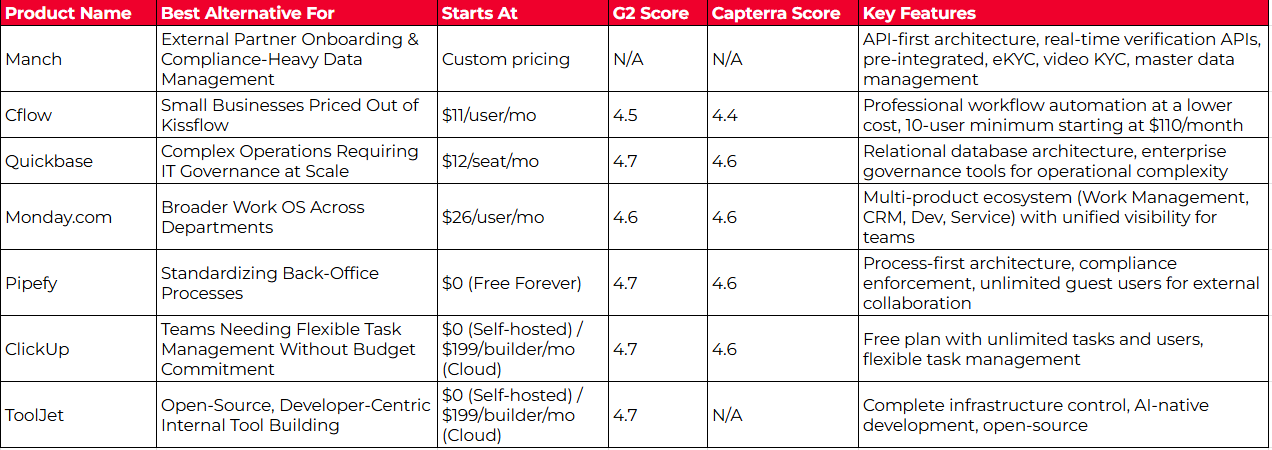
While Kissflow excels as a unified work platform for mid-market companies digitizing internal operations, different organizations have specific requirements that purpose-built tools address more effectively. Based on our research, here are the best alternatives:
- Manch for enterprises managing external partner ecosystems with compliance requirements. Its API-first architecture with pre-integrated real-time verification APIs, built-in eKYC/vKYC, and master data management capabilities enable go-live in weeks with significantly lower total cost of ownership than traditional enterprise platforms.
- Cflow for small businesses priced out of Kissflow’s $2,500 minimum who need affordable, focused workflow automation
- Quickbase for complex operations requiring relational database architecture and enterprise IT governance at scale
- Monday.com for organizations wanting a broader Work OS with department-specific products and cross-portfolio visibility
- Pipefy for back-office teams needing process standardization with enforcement guardrails and unlimited external guest users
- ClickUp for teams seeking flexible task management with zero upfront cost and consolidated workspace capabilities
- ToolJet for developer-led organizations requiring open-source transparency, self-hosting, and AI-native internal tool development
Organizations may find value in using Kissflow for internal workflow automation while adding specialized tools for external stakeholder management, complex operational data, or specific departmental needs. Consider your specific requirements and growth plans when deciding which solution works best for you.
Ready to transform how you manage external partner relationships? Discover how Manch’s API-first platform can digitize your partner onboarding, ensure compliance with built-in real-time verification, and create a single source of truth for all your external master data—with go-live in weeks, not months.


 DISCLAIMER: We aren’t covering every workflow automation tool on the market. Our focus is on highlighting the best alternatives that address specific use cases where specialized platforms may offer advantages over Kissflow’s generalist approach.
